
Intégration
Qwoty + Salesforce: From Salesforce Opportunity to Signed Order. Without the Spreadsheets in Between
CRM & ERP

Most B2B mid-market companies have Salesforce for CRM and an ERP for operations — but nothing between the two to handle what happens after a deal is qualified. Sales reps leave Salesforce to build quotes in Excel, pricing rules live in someone’s head, approvals happen over email, and orders get re-entered manually into the ERP. The result: slow cycles, inconsistent margins, and data that never matches between systems.
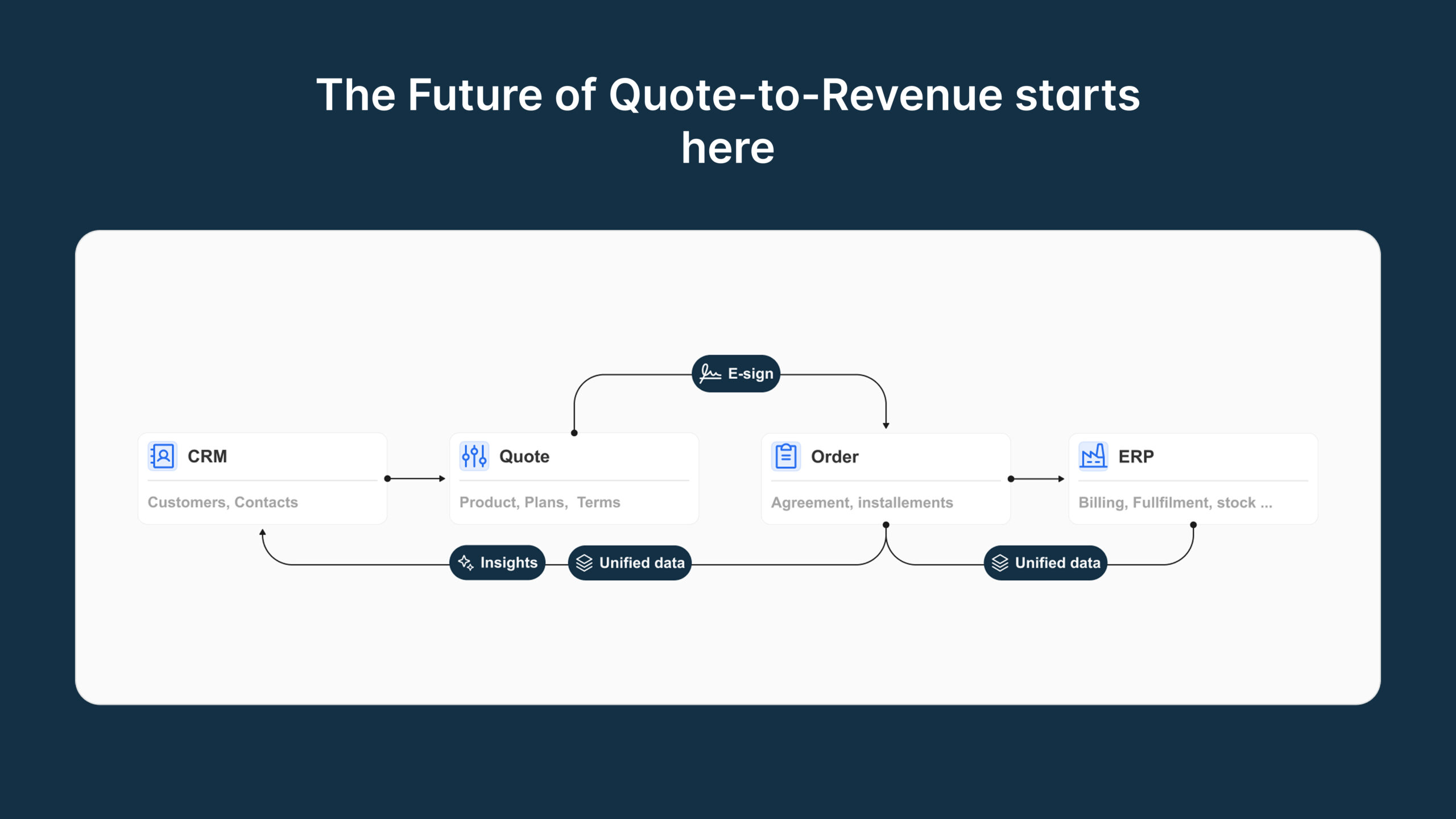
Qwoty connects directly to Salesforce and bridges the gap between your CRM and your ERP. Accounts, contacts, and opportunity data flow from Salesforce into Qwoty automatically. Quotes are built, priced, approved, and signed inside Qwoty — then quote status, updated amounts, and opportunity stage are pushed back to Salesforce in real time. Orders land in your ERP without anyone retyping a line item. The full cycle, in one connected flow, live in 4 to 6 weeks.
What you can do with Qwoty connected to Salesforce:
- Generate a complete, priced quote directly from a Salesforce opportunity in a few clicks — no copy-pasting, no switching tools
- Apply your pricing rules, discount tiers, and approval workflows automatically, based on the deal data already in Salesforce
- Keep Salesforce opportunity stages and amounts in sync as quotes progress through review, signature, and acceptance
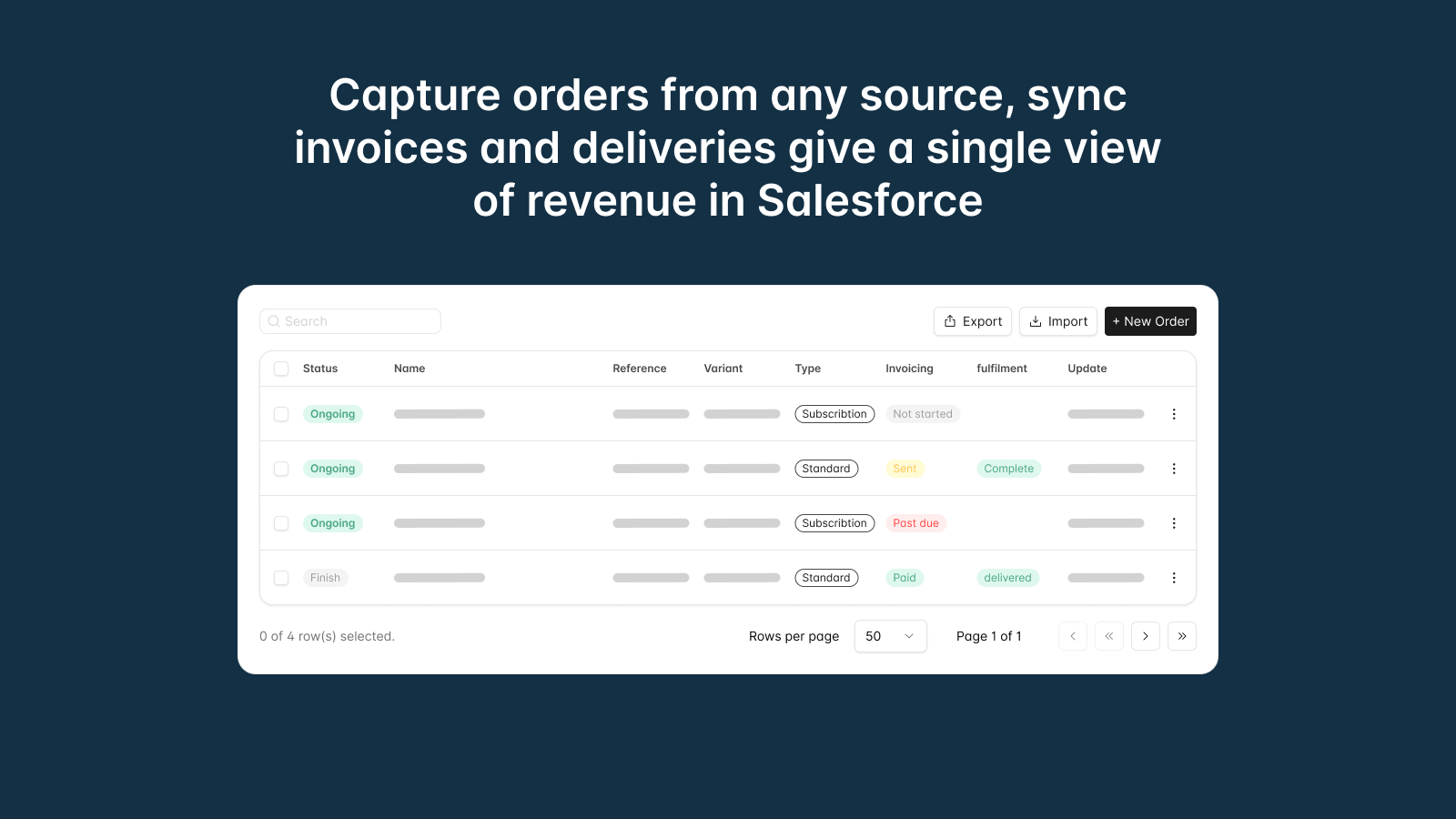
- Convert accepted quotes into orders that flow to your ERP — without re-entry and without leaving Salesforce to trigger the process
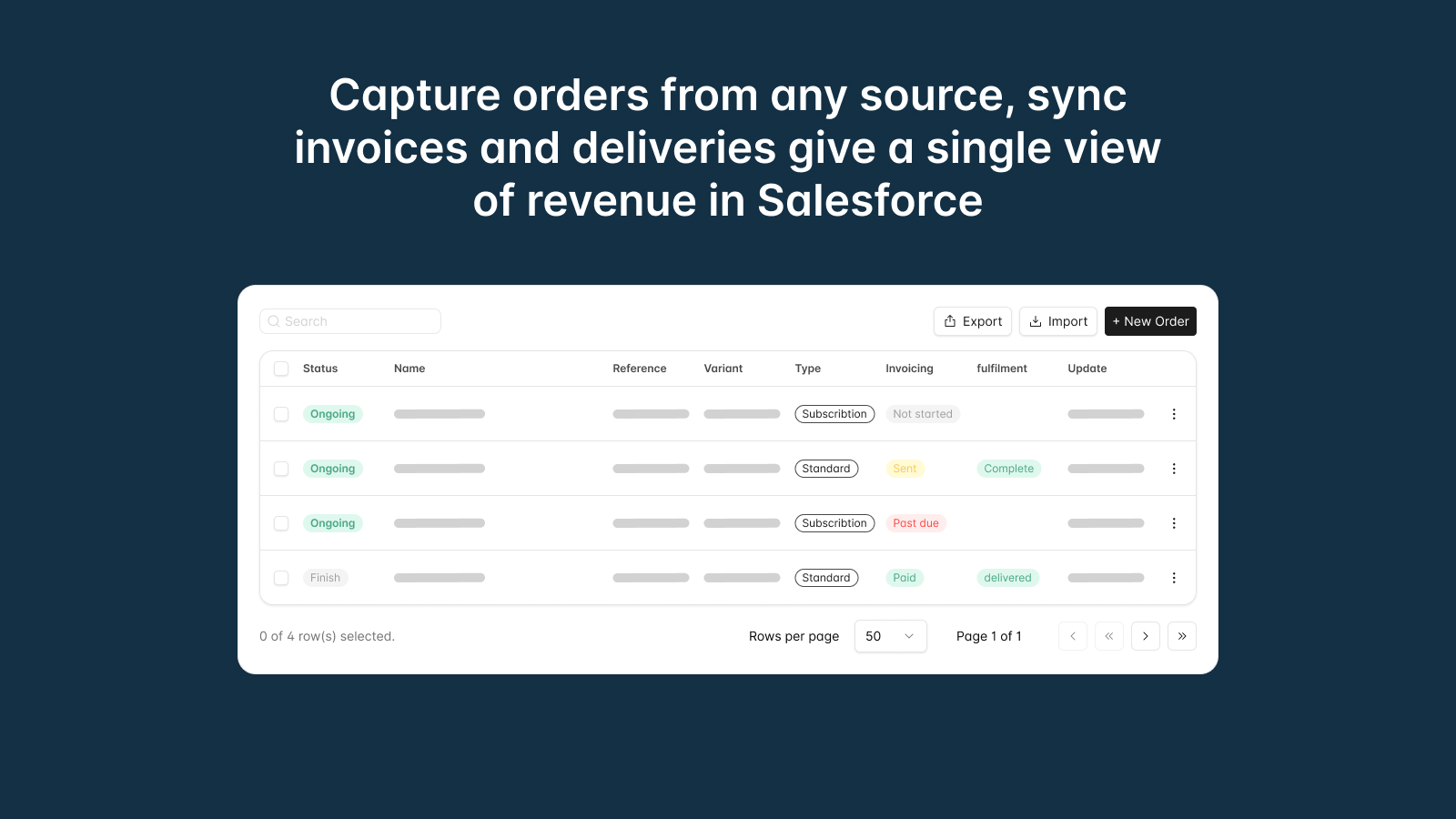
- Track every quote, contract, and order status directly in Salesforce, so your CRM stays the single source of truth for your sales team
Quotes that start in Salesforce — and actually finish
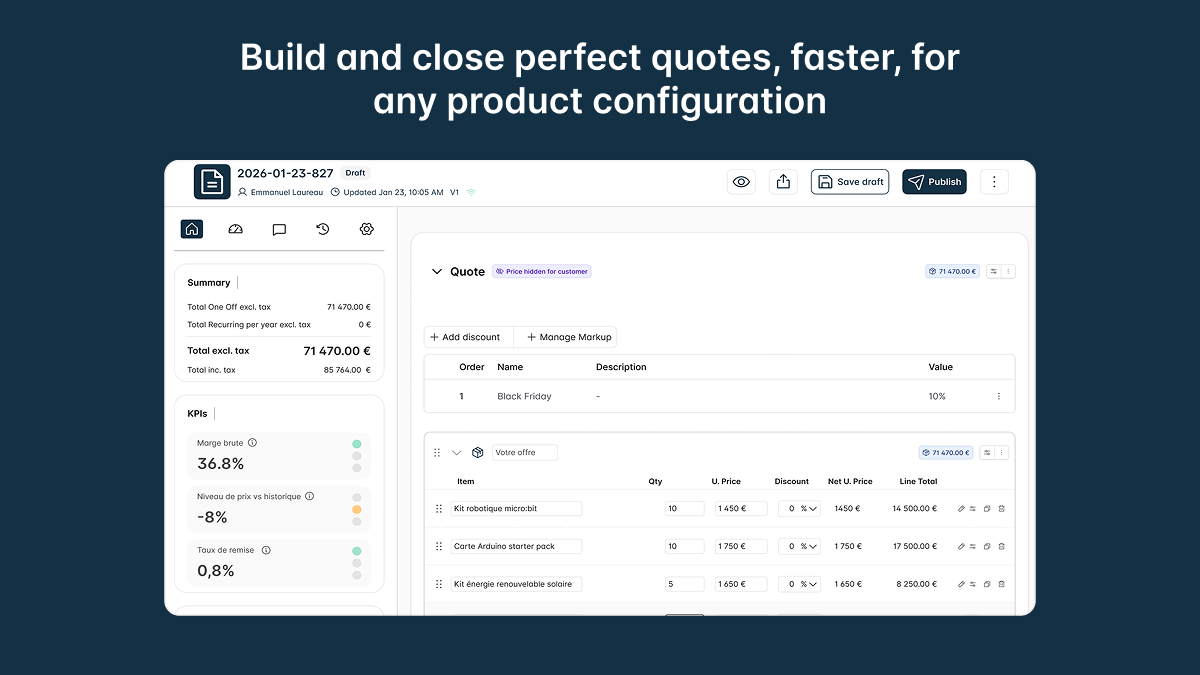
When a rep opens a Salesforce opportunity and triggers a quote in Qwoty, the account details, contact information, and product lines are already there. No blank form, no manual lookup. Qwoty reads the Salesforce opportunity and pre-populates the quote — so reps spend their time on pricing and deal strategy, not data entry. From that point, the full quoting workflow runs inside Qwoty: catalog selection, pricing rules, line-item configuration, discount approval, e-signature, and order conversion. Every status change writes back to Salesforce automatically.
Pricing rules and approvals that don’t depend on tribal knowledge
Salesforce stores your customer and deal data. Qwoty holds your pricing logic — customer-segment pricing, volume tiers, contract rates, discount thresholds. When a quote is generated from a Salesforce opportunity, Qwoty applies the right price book automatically based on the account type and deal context. Discount approval workflows route to the right manager based on percentage thresholds or deal size, without anyone configuring a rule manually per quote. Reps get guardrails. Managers get visibility. Margins stop eroding by accident.
Salesforce stays current — without anyone manually updating it
The biggest hidden cost of disconnected tools is the time sales ops spends reconciling Salesforce with what actually happened. With Qwoty connected to Salesforce, that reconciliation disappears. When a quote is sent, Salesforce reflects it. When a client signs, Salesforce reflects it. When an order is confirmed, Salesforce reflects it — along with the final amount. Opportunity stages update automatically based on quote lifecycle events. Your Salesforce pipeline data is accurate, without asking reps to remember to update it.
Orders flow to your ERP — Salesforce doesn’t need to know the details
Once a quote is signed and accepted in Qwoty, it converts to an order and routes to your ERP. Salesforce gets the order status and confirmation. Your ERP gets the structured order data — product lines, quantities, delivery terms, customer references — without anyone re-entering it. Qwoty does not replace your billing system or your ERP. It connects to both, passes the right data at the right moment, and gets out of the way. The result is a closed loop from Salesforce opportunity to ERP order, with no manual handoffs and no data gaps.
Everything the Salesforce + Qwoty integration covers
Five modules, one connection to Salesforce — covering the full quote-to-order cycle without adding complexity to your stack.
Bidirectional Salesforce Sync
Salesforce pushes accounts, contacts, and opportunity data into Qwoty. Qwoty pushes quote status, opportunity stage, and deal amounts back to Salesforce — automatically, at every lifecycle event.
Pricing Rules on Salesforce Data
Price books, volume tiers, and customer-segment rates apply automatically based on the Salesforce account type and opportunity context — no manual selection required from the rep.
Approval Workflows
Discount and deal-size thresholds trigger routed approval workflows inside Qwoty. Salesforce reflects approval outcomes without requiring managers to log into a separate tool to unblock a quote.
E-Signature Linked to Salesforce
Contracts and quotes sent for signature from Qwoty update the Salesforce opportunity stage when the client signs. No manual update needed — the stage moves to Closed Won when the signature lands.
Order Conversion to ERP
Accepted quotes become orders in Qwoty and route to your ERP without re-entry. Salesforce receives the order status confirmation. Your billing and operations systems are not replaced — they receive structured data.
AI Document Parsing
When prospects send RFQs by email or PDF, Qwoty’s AI reads the document and pre-fills a draft quote — already linked to the matching Salesforce opportunity. Useful for high-volume inbound requests.
What syncs between Salesforce and Qwoty
How it works
Connect Qwoty to Salesforce — no code, no consultant
Authorize the Salesforce integration from your Qwoty settings. Qwoty maps your Salesforce objects — Accounts, Contacts, Opportunities, Products — to the corresponding Qwoty entities. Your existing Salesforce data structure is not modified. Setup takes hours, not weeks. No Salesforce admin or dedicated consultant is required to go live.
Generate quotes directly from Salesforce opportunities
Reps open a Salesforce opportunity and trigger a Qwoty quote. Account data, contact details, and opportunity context are pulled automatically. Qwoty applies the correct price book and discount rules based on the Salesforce account type. The rep configures the product lines, adjusts if needed, and submits for approval — all inside Qwoty, with Salesforce always reflecting the current status.
Sign, convert to order, and close — Salesforce and ERP updated automatically
Once the client signs, Qwoty updates the Salesforce opportunity stage and amount. The accepted quote converts to an order in Qwoty and routes to your ERP with the full product and customer data — no re-entry. Salesforce receives the order confirmation. Your sales team sees a closed deal. Your operations team sees a structured order. Nobody typed anything twice.
Why not use Salesforce Revenue Cloud (CPQ)?
Salesforce Revenue Cloud is the native CPQ option for Salesforce customers — and for large enterprise accounts with a dedicated Salesforce admin, a 3 to 6 month implementation timeline, and a budget for ongoing customization, it can work. But for B2B mid-market companies that need quoting, approvals, contracts, and order management running inside Salesforce within weeks — not quarters — Salesforce Revenue Cloud is regularly overkill and consistently underdelivers on speed to value.
Qwoty goes live in 4 to 6 weeks. It connects to Salesforce natively, without requiring a Salesforce consulting engagement or a certified Revenue Cloud admin. Pricing starts at €15 per user per month. And because Qwoty also connects to your ERP directly, you get the full quote-to-order loop — something Salesforce Revenue Cloud alone does not close. See the full comparison →
Qwoty vs. Salesforce Revenue Cloud — the practical differences:
- Implementation time: Qwoty live in 4–6 weeks — Salesforce Revenue Cloud typically requires 3 to 6 months with a dedicated implementation partner
- Admin dependency: Qwoty requires no certified Salesforce admin to configure or maintain — Salesforce Revenue Cloud does
- ERP connection: Qwoty connects natively to 5 ERPs and routes orders directly — Salesforce Revenue Cloud stops at the quote and requires separate ERP integration work
- Pricing: Qwoty starts at €15/user/month — Salesforce Revenue Cloud licensing adds significant cost on top of your existing Salesforce contract
- Billing system: Qwoty does not replace your existing billing or ERP — it connects to both, so you keep your current financial stack intact while closing the quote-to-order gap
Vous voulez en savoir plus ?
Réservez une démo de 30 minutes pour en savoir plus sur Qwoty et cette intégration. Notre équipe d'experts pourra répondre à toutes vos questions.
100% sécurisé. Aucune carte de crédit n'est requise.
